How to Organize Your Taxes in One Hour (Even If You’re Behind)
If tax season makes you feel behind before you even start, you’re not lazy—you’re overloaded. Most “tax prep” advice assumes you already have neat folders, perfect memory, and a calm Saturday morning. Real life looks different.
This guide is a plain-English, one-hour plan to organize taxes fast—whether you’re a W-2 employee, you have a side hustle, you’re self-employed, or you’ve got a mix of everything. No fancy spreadsheets required.
Before you start, grab a timer and remind yourself: progress over perfection. Your goal today is not “finish taxes.” Your goal is to get your tax stuff organized so filing becomes simple.
Disclosure
This article contains affiliate links. If you choose to make a purchase through these links, we may earn a commission at no additional cost to you.
What “organize taxes” actually means (in normal human language)
When people search how to organize taxes, what they usually mean is:
- “What documents do I need for taxes?”
- “Where do I put receipts so I can find them later?”
- “How do I stop missing forms and panicking?”
So here’s the simple definition:
Organizing your taxes = putting every tax-related paper, form, and receipt into a small set of labeled buckets so you can file without guessing.
Example:
- Your W-2 goes in “Income.”
- Your medical receipts (if you’re tracking them) go in “Health.”
- Your side hustle mileage notes go in “Work Expenses.”
That’s it.
The 1-hour tax organization plan (set a timer)
You’re going to do this in four sprints. Set a timer for each one.
Sprint 1 (10 minutes): Set up your 5 folders
You only need five categories to organize tax paperwork:
- Income (W-2, 1099, side hustle income, unemployment)
- Deductions / Expenses (work expenses, donations, medical—only if you track these)
- Accounts (bank interest forms, retirement forms)
- Home & Family (mortgage interest, property tax, childcare forms)
- To-Do / Missing (anything you’re waiting on)
Do this either:
- Paper system: 5 physical folders, or
- Digital system: 5 folders in your computer/Drive
Tip: If you’re using paper, keep one folder labeled “To-Do / Missing” so loose papers don’t become a doom pile.
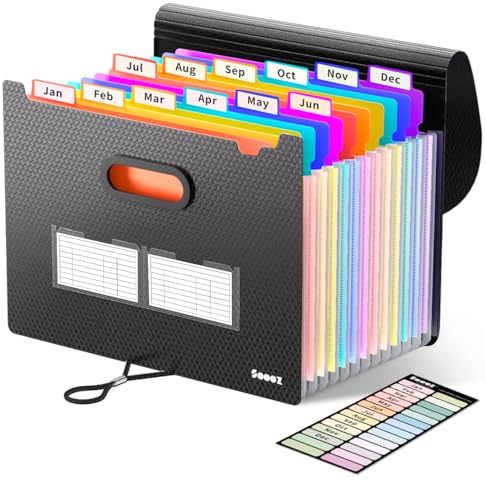
A portable expanding file folder (12–24 pockets) so you can sort forms by category as they arrive. It’s the simplest “system” that actually gets used.
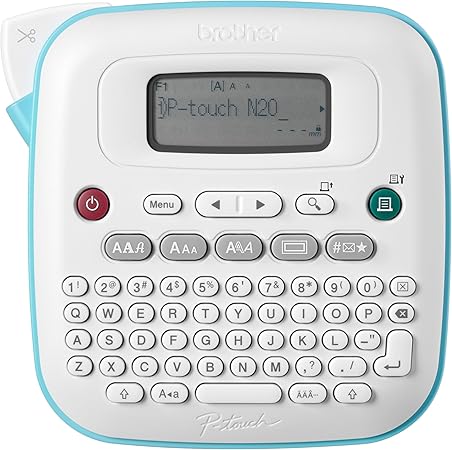
Sprint 2 (15 minutes): Gather everything (no sorting yet)
This is the “sweep the house” step.
- Check your mail pile
- Check your glove box (yes, really)
- Check your backpack/work bag
- Search your email for “tax,” “1099,” “W-2,” “interest,” “statement”
Don’t read anything yet. Just gather.
If you’re missing forms, don’t panic. Put a sticky note on it and drop it into To-Do / Missing.
Sprint 3 (25 minutes): Sort fast using the 10-second rule
Now you’ll organize tax documents quickly.
Use the 10-second rule:
- If you can decide where it goes in 10 seconds, file it.
- If not, put it in To-Do / Missing and keep moving.
Here’s what usually goes where:
- Income
- W-2 (job)
- 1099-NEC / 1099-K (contract work, side hustle)
- Unemployment form
- Accounts
- Bank interest form (often called 1099-INT)
- Retirement contribution forms
- Home & Family
- Mortgage interest statement
- Property tax statement
- Childcare statements
- Deductions / Expenses (plain-English version)
- “Stuff you paid for to do your work” (examples: tools, supplies, software)
- Donations receipts
- Medical receipts (only if you’re tracking them)

Sprint 4 (10 minutes): Create your “missing items” list
Open your To-Do / Missing folder and write a short list:
- What you’re missing
- Where it should come from (employer, bank, platform)
- How to get it (email, download, request)
This list is what stops the spiral. It turns “I’m behind” into “I have 3 things to do.”
Tax documents checklist (quick version)
If you want a full, plain-English list, use these internal guides:
- Tax Season for Regular Guys: The Simple 2026 Checklist (No CPA Speak)
- What Documents Do I Need to File Taxes? A Simple Checklist for 2026
In the meantime, here’s the simple checklist most people need:
- Income forms (W-2, 1099s)
- ID info (Social Security numbers for you/dependents)
- Bank/retirement forms (interest, contributions)
- Home/family forms (mortgage interest, childcare)
- Any receipts you’re tracking (work expenses, donations)
If you’re self-employed or have a side hustle (keep it simple)
If you have side hustle income, the goal is to separate two things:
- Money that came in (income)
- Money you spent to earn it (expenses)
Plain examples:
- Rideshare driver: mileage + car supplies
- Etsy seller: materials + shipping
- Freelancer: software + home office basics
You don’t need perfect bookkeeping today. You just need your papers and downloads in one place.

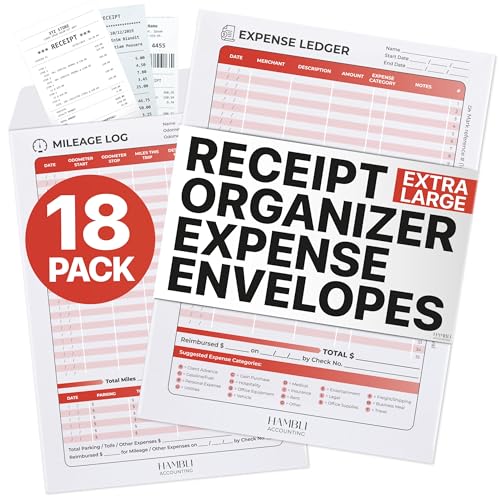
Keep it organized in 10 minutes a week (so next year is easy)
Once you’ve done the one-hour reset, maintenance is simple:
- Every Friday (or payday), spend 10 minutes:
- Drop new tax mail into the right folder
- Screenshot/scan any important receipts
- Update your “To-Do / Missing” list
If you want to go digital, create a repeating calendar reminder called “10-minute tax tidy.”
Common mistakes that keep people stuck
- Trying to “do taxes” before you organize taxes
- Mixing personal and side hustle receipts in one pile
- Spending 30 minutes on one confusing form
- Not creating a “missing items” list
Remember: your goal is momentum.
FAQ: Organizing taxes (plain-English answers)
Conclusion: One Hour Now = Way Less Stress Later
If you take nothing else from this, take this: you don’t have to “catch up on everything” tonight. You just need a simple system that makes it easy to find what you need when it’s time to file.
That’s why this one-hour reset works. When you organize taxes into a few clear folders, you stop guessing, you stop digging through piles, and you stop feeling like you’re behind every time you think about tax season.
Remember the goal:
- Gather everything (even if it’s messy)
- Sort it into the 5 folders
- List what’s missing (so you have a plan, not panic)
If you want a simple next step, use these two guides to double-check you’ve got the right stuff:
- Tax Season for Regular Guys: The Simple 2026 Checklist (No CPA Speak)
- What Documents Do I Need to File Taxes? A Simple Checklist for 2026
Your micro-action: set a 10-minute timer right now and create the five folders. Once that’s done, you’re no longer “behind”—you’re organized and moving forward.
Disclosure
This article contains affiliate links. If you choose to make a purchase through these links, we may earn a commission at no additional cost to you.
Important Note: The information provided in this article is for educational purposes only and should not be considered financial advice. Always consult with a qualified financial advisor before making significant financial decisions. Your situation is unique, and these general guidelines may need to be adjusted to your specific circumstances.